
All of your continuing education credits live inside your Member Compass. Log in once and you can view every credit, download individual certificates, or pull a single report to submit to NYSED.
Log in to your Member Compass
Use the button above, then sign in with your NYSVMS email and password. (Forgot it? Use the “Login & Password” reset on the sign-in screen.)
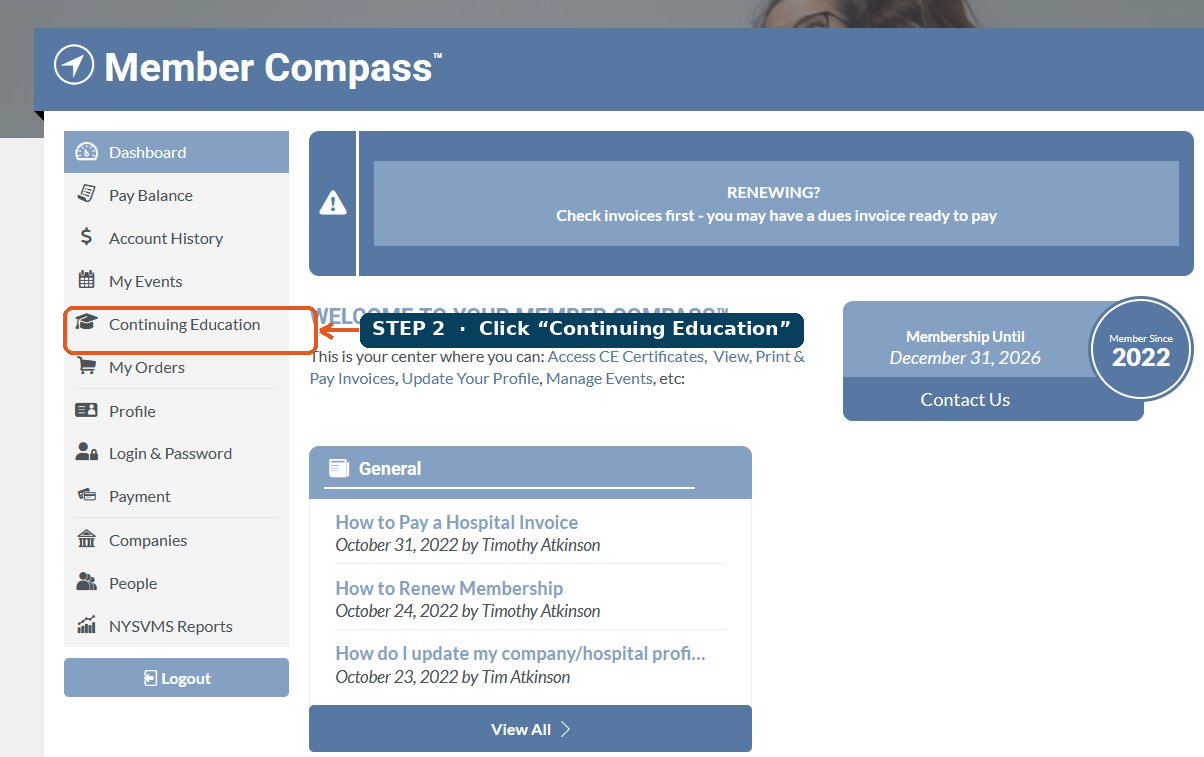
Click “Continuing Education” in the left menu
It’s in the gray navigation column on the left side of your dashboard.
View your credits and download what you need
Every credit you’ve earned is listed here. You have two ways to get a copy:

Continuing Education Report (top-right) — choose a date range and download a single PDF of all your credits. This is the report to submit to NYSED at license renewal.
View Credit (next to each event) — download an individual certificate for one course at a time.
Your CE credits are private to you and are not visible to others on your account, even those with management access.